Seamless Masks: Practical Vector Patterns for Professional Design Work
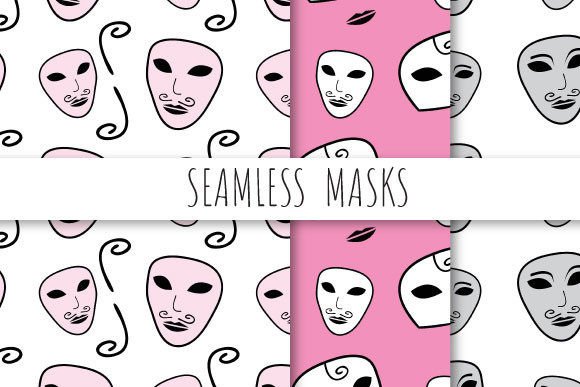
Seamless Masks are precision-crafted, tileable vector patterns designed to integrate effortlessly into professional design workflows—without visible seams, repetition artifacts, or resolution loss. Each pattern is built as a true seamless repeat, meaning it tiles infinitely in all directions while maintaining visual continuity and structural integrity. These aren’t just decorative elements; they’re production-ready assets engineered for real-world use across print, digital, and motion graphics projects.
Why Seamless Masks Solve Real Design Challenges
Designers, illustrators, and production artists frequently face situations where repetitive backgrounds, textures, or overlays must scale flawlessly—whether filling a billboard, wrapping a product mockup, or animating a UI layer. Common pain points include:
- Visible tiling—patterns that “pop” at edges when repeated, breaking immersion;
- Resolution dependency—raster-based repeats that pixelate or blur when scaled beyond original dimensions;
- Workflow friction—having to manually adjust alignment, crop, or re-export for each new use case;
- Print readiness gaps—assets lacking CMYK support, bleed handling, or high-DPI fidelity for commercial output.
Seamless Masks directly address these issues by delivering vector-based, mathematically precise repeats—guaranteeing clean, scalable, and predictable behavior across every application.
What’s Inside the Seamless Masks Package
Each Seamless Masks download is a carefully curated zip archive containing six complementary files—all sized to 12 × 12 inches (3600 × 3600 pixels at 300 dpi) for optimal versatility:
- Three EPS 10 files—fully editable, resolution-independent vector patterns with layered structure and transparency support. Ideal for Illustrator, InDesign, and prepress workflows.
- Three high-res JPEG files—optimized raster versions for quick placement in Photoshop, web layouts, or presentations where vector editing isn’t required.
This dual-format approach ensures flexibility: use EPS when you need to recolor, resize, or modify individual elements; choose JPEG when speed, compatibility, or preview fidelity matters most.
Practical Applications Across Industries
Seamless Masks aren’t limited to background fills—they serve functional roles across disciplines:
Print & Packaging Design
For luxury packaging or stationery, a subtle geometric Seamless Mask can add tactile depth to foil-stamped surfaces or embossed textures—without requiring custom engraving plates. Because each pattern is built at true 300 dpi and includes full vector paths, it prints crisply even at large formats like posters or retail signage.
Digital Interface & Web Design
UI designers use Seamless Masks as non-distracting backdrop layers behind cards, modals, or hero sections. Unlike CSS-generated gradients or noise textures, these patterns offer intentional rhythm and visual hierarchy—enhancing readability without sacrificing performance (especially when using the lightweight JPEG variants).
Motion Graphics & Video Overlays
In After Effects or Premiere Pro, Seamless Masks provide consistent texture layers for lower-thirds, transitions, or animated backgrounds. Their seamless nature eliminates edge “crawl” during pan or zoom effects—no manual offsetting needed. The 3600 × 3600 pixel resolution comfortably covers 4K timelines with room to spare.
Fashion & Surface Pattern Design
Textile designers repurpose Seamless Masks as base structures for fabric repeats—adjusting color palettes, scaling motifs, or combining with hand-drawn elements. The EPS format preserves anchor points and Bezier curves, making it easy to adapt motifs for screen printing or digital textile printing.
How Different Users Get the Most From Seamless Masks
Your workflow determines how you’ll engage with Seamless Masks—and that’s by design.
Illustrators and Brand Designers will appreciate the EPS files’ editable layers. You can isolate strokes, recolor swatches globally, or extract individual shapes to build custom icons or logos—without starting from scratch. Because the patterns are built in EPS 10 (compatible with CS6 and newer), legacy project files remain fully functional.
Production Artists and Prepress Specialists benefit from the exact 12 × 12 inch, 300 dpi specifications—no guesswork when placing into InDesign layouts or preparing for offset printing. The vector nature also supports spot color separation and overprint settings without rasterization.
Web Developers and Front-End Designers often start with the JPEG versions for rapid prototyping. When performance allows, embedding the SVG equivalent (easily exported from the EPS source) delivers crisp rendering on any device—while retaining accessibility via aria-label and semantic markup.
Key Considerations Before Use
To maximize effectiveness, keep these practical tips in mind:
- Test tiling early: In Illustrator, use Object > Pattern > Make to preview how your Seamless Mask behaves when repeated—even if the file is already seamless, confirming behavior in your specific document context prevents surprises.
- Respect color mode: While EPS files retain CMYK/RGB flexibility, verify your document’s color profile before final export—especially for brand-critical projects where Pantone matching matters.
- Scale intentionally: Though vector-based, extremely tight zooms may reveal subtle path complexity. For micro-detail work (e.g., laser engraving guides), inspect anchor density in Outline Mode (Ctrl+Y) and simplify if needed.
- Leverage both formats: Don’t treat EPS and JPEG as interchangeable—use them as complementary tools. For example: design layout in Illustrator with EPS, then export flattened JPEGs for client PDFs or CMS uploads.
Getting Started Is Simple—and Immediately Useful
You don’t need advanced vector skills to begin using Seamless Masks. Open an EPS file in Adobe Illustrator, drag it onto your artboard, and scale freely. Want a softer look? Apply a subtle Gaussian Blur (with Object > Rasterize only if necessary). Need contrast? Adjust blending modes—Multiply works beautifully for dark-on-light overlays; Screen enhances light-on-dark subtlety.
For Photoshop users: place the JPEG version as a Smart Object to preserve editability, then use Layer Masks or Blend If sliders to integrate it organically with photography or typography. The consistent 3600 × 3600 pixel dimension means no resizing guesswork—it fits standard print templates and social media banners with minimal adjustment.
Most importantly, Seamless Masks reduce decision fatigue. Instead of hunting for “just right” textures or rebuilding patterns from scratch, you gain reliable, professional-grade foundations—freeing mental bandwidth for higher-level creative choices.
A Resource Built for Real Work, Not Just Aesthetics
Seamless Masks reflect a deeper principle: great design resources shouldn’t demand compromise. They should accelerate execution while elevating quality. Whether you’re refreshing a brand guideline, building a pitch deck, or preparing assets for global manufacturing, Seamless Masks deliver consistency, control, and confidence—without hidden trade-offs.
They’re not just patterns. They’re quiet enablers—designed so you spend less time fixing edges and more time shaping ideas that matter.