Eyes: Precision Vector Patterns for Seamless Design Workflows
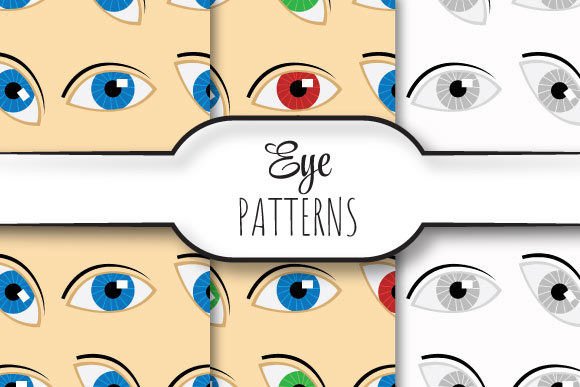
When designers, print professionals, and digital creators need flawless, scalable, and endlessly repeatable background textures—especially for high-resolution output—Eyes delivers a focused, production-ready solution. Unlike generic pattern packs or low-fidelity raster assets, Eyes is a curated set of vector-based seamless patterns built specifically for professional-grade applications where clarity, consistency, and technical precision matter.
Each Eyes pattern is crafted at 12 × 12 inches (3600 × 3600 pixels) at 300 dpi—ensuring crisp reproduction across large-format prints, packaging mockups, textile layouts, and editorial backgrounds. The inclusion of EPS 10 files guarantees full editability in Adobe Illustrator and other vector-native environments, while the companion JPEGs offer immediate drag-and-drop usability for quick comps, web previews, or non-vector workflows.
Why Seamless Repeating Patterns Matter in Real Projects
Seamless vector patterns solve a quiet but persistent challenge: the visual disruption caused by visible tile edges, pixelation at scale, or inconsistent spacing when tiling manually. Whether you’re designing luxury product labels, branding collateral for a boutique client, or immersive UI backgrounds for a creative agency site, even subtle misalignments undermine perceived quality.
Users often encounter these situations:
- Print production delays due to raster-based patterns that blur or distort when scaled beyond their native resolution;
- Time lost reworking tiles in Illustrator or Photoshop to eliminate seams or adjust color balance across repeats;
- Brand inconsistency when the same pattern appears differently across business cards, banners, and merchandise because of format limitations;
- Licensing uncertainty with free pattern resources that lack commercial-use clarity or editable source files.
Eyes directly addresses each of these—not as a “nice-to-have” asset, but as a workflow accelerator grounded in real-world constraints.
How Eyes Supports Different Creative Roles
Designers, production artists, and marketing teams don’t use patterns the same way—and Eyes reflects that diversity without overcomplication.
For graphic designers: The EPS 10 files let you recolor, resize, or rotate any pattern non-destructively. Need a navy version of the geometric dot motif for a stationery suite? Adjust the swatch—no re-exporting required. Because all vectors are fully layered and named, you can isolate elements (like subtle line overlays or background grids) and modify them independently.
For print production specialists: The 300 dpi, 12×12-inch JPEGs match standard prepress requirements for soft proofs and press checks. More importantly, the EPS files embed cleanly into InDesign layouts without rasterization warnings or resolution prompts—reducing last-minute file prep stress before a print run.
For digital product teams: While primarily built for print fidelity, the JPEGs export cleanly for web use at optimized sizes (e.g., 1200×1200 px for hero sections), and the vector nature means you can generate SVG variants for responsive backgrounds if needed. The clean geometry and balanced negative space in each Eyes pattern also translate well to dark-mode interfaces and accessible contrast ratios.
Practical Applications You Can Implement Today
You don’t need a complex project to benefit from Eyes. Here’s how users are applying it right now:
- Product packaging prototypes: Apply a subtle tonal pattern as an underlayer behind transparent logo elements—giving depth without competing visually. The seamless repeat ensures no awkward cutoffs on curved or die-cut surfaces.
- Branded presentation decks: Use one of the three patterns as a consistent slide background across 50+ pages. Because it’s vector-based, it stays sharp whether viewed on a MacBook or projected onto a 12-foot screen.
- Textile or surface design exploration: Import the EPS into programs like Clo3D or Marvelous Designer to test how the pattern drapes or distorts across 3D garment forms—without worrying about pixel interpolation artifacts.
- Editorial layout texture: Layer a low-opacity Eyes pattern beneath body text blocks to add tactility to long-form digital articles—enhancing readability through gentle visual rhythm rather than stark white space.
What to Consider Before You Begin
While Eyes removes many common friction points, thoughtful implementation still matters. Here are practical considerations backed by user feedback:
- Color mode alignment: All EPS and JPEG files are provided in CMYK by default—ideal for print—but can be converted to RGB in Illustrator for screen-only use. Always verify your document’s color profile before scaling or recoloring.
- Tile boundaries: Though truly seamless, some patterns include intentional micro-variations at the edge to avoid mechanical repetition. If you plan to extend the tile beyond its native 12×12-inch frame, test a 2×2 grid first to confirm visual harmony.
- File management: The ZIP contains three EPS + three JPEG pairs—named consistently (e.g., Eyes-Geometric01.eps / Eyes-Geometric01.jpg). Keep both versions together in your asset library; the JPEGs serve as fast visual references during early-stage moodboarding.
- Scalability limits: Vector patterns scale infinitely—but extremely large outputs (e.g., 10-ft banners) may require testing in your RIP software. When in doubt, open the EPS in Illustrator, expand the pattern, and save a flattened PDF/X-4 for guaranteed compatibility.
Moving Beyond “Just a Pattern Pack”
Eyes isn’t about adding more options to your library. It’s about reducing decision fatigue, eliminating technical rework, and anchoring your visual language in consistency. The 12×12-inch canvas size wasn’t chosen arbitrarily—it aligns with common large-format print standards and provides ample room for detail without bloating file size. The EPS 10 format ensures backward compatibility with older Illustrator versions while preserving transparency, gradients, and editable paths.
And because the set includes exactly three distinct patterns—each with its own structural logic (e.g., organic flow, modular geometry, rhythmic line work)—it encourages intentional selection rather than endless scrolling. You’re not choosing *a* pattern. You’re choosing the right pattern for the message, medium, and audience.
If your goal is to produce work that feels considered—not just completed—Eyes gives you a reliable, silent partner in the details. No tutorials required. No plugins needed. Just precision, ready when you are.