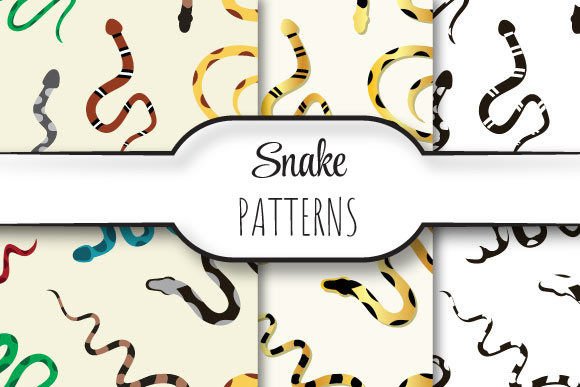
Snakes: Seamless Vector Patterns for Professional Design Projects
Snakes is a curated collection of meticulously crafted, seamlessly repeating vector patterns—designed specifically for designers, print professionals, and digital creators who need high-fidelity, scalable assets without compromise. Unlike generic tileable graphics or low-resolution downloads, Snakes delivers precision-engineered patterns that repeat flawlessly across any surface, from business cards to billboards. Each pattern is built with mathematical consistency and visual harmony, ensuring zero visible seams, no distortion at scale, and full editability in professional vector workflows.
Why Seamless Repeating Patterns Matter in Real-World Work
Whether you're developing branded packaging, designing textile prints, creating presentation templates, or preparing assets for large-format printing, repetition integrity is non-negotiable. A single misaligned tile can break visual continuity—especially when scaled to 12×12 inches or larger. Many designers struggle with patterns that:
- Stretch or blur when enlarged beyond screen resolution,
- Contain subtle alignment gaps that become glaring at 300dpi output,
- Are locked in raster formats (like PNG or JPG) and resist color adjustments or resizing,
- Lack native support for spot color separation or Pantone matching,
- Require time-consuming manual tiling or scripting just to achieve continuity.
These aren’t edge cases—they’re daily friction points for freelancers, in-house designers, and production teams working under tight deadlines and strict quality standards.
How Snakes Solves These Challenges Directly
Snakes eliminates the guesswork and rework by delivering three production-ready EPS 10 files—each precisely sized to 12×12 inches (3600×3600 pixels at 300dpi), fully vector-based, and built with Illustrator-compatible construction. Because they’re native EPS 10, they retain full path data, layers, and editable attributes—no flattening, no rasterization, no loss of control.
The inclusion of corresponding JPEG files isn’t an afterthought—it’s a practical bridge. Use the JPEGs for quick mockups, client previews, CMS uploads, or social media placeholders while preserving the EPS originals for final output. This dual-format approach respects real-world workflow diversity: some users need pixel-perfect previews fast; others require absolute fidelity for press-ready files.
Practical Applications Across Industries
Print & Packaging Designers: Apply Snakes patterns directly as swatches or clipping masks in Adobe Illustrator or InDesign. Their 12×12 inch base size aligns perfectly with common dieline dimensions for boxes, labels, and hang tags—no scaling artifacts, no bleed concerns. For foil-stamped or embossed packaging, the clean vector paths ensure crisp tooling registration.
Textile & Surface Pattern Designers: Import Snakes into programs like Adobe Photoshop (via Smart Objects) or specialized tools like Kaledo or Nest. The seamless repeat means you can generate infinite repeats for fabric sampling or wallpaper visualization—without manual cloning or offset corrections. The 300dpi resolution ensures accurate color and detail rendering on physical swatches.
Digital Product & UI Designers: While primarily vector-based, the included JPEGs serve as immediate, high-res background assets for Figma, Sketch, or Webflow projects. Use them as subtle texture overlays on hero sections, dashboard backgrounds, or email headers—enhancing visual depth without sacrificing load performance (thanks to optimized, compressed JPEGs).
Educators & Students: Snakes offers a teachable example of professional pattern construction—how anchor points, bounding boxes, and tile spacing interact at production scale. It’s a tangible reference for learning about repeat units, artboard alignment, and EPS version compatibility in academic or studio settings.
Key Considerations for Best Results
Not all seamless patterns behave the same way across software or output methods. Here’s what to keep in mind when using Snakes:
- Always use the EPS files for final output. JPEGs are preview-only—they lack scalability and editing flexibility. If your printer requests native vector files, EPS 10 is widely accepted and backward-compatible with most RIP systems.
- Verify color mode before export. Snakes patterns are delivered in CMYK by default—ideal for commercial printing. Switch to RGB only if the final use is strictly digital (e.g., web banners or presentations).
- Test tiling behavior in your target application. In Illustrator, drag the pattern into Swatches and apply it to a shape—then zoom to 400% to inspect seam integrity. In Photoshop, define the pattern via Edit > Define Pattern and sample across a large canvas.
- Respect the 12×12 inch canvas. This isn’t arbitrary—it’s the industry-standard repeat unit size for large-scale applications. Scaling *down* is safe; scaling *up* beyond 3600×3600 pixels risks interpolation unless you’re working natively in vector.
Different Users, Different Approaches—All Served by Snakes
A freelance branding designer might drop a Snakes pattern into a brand guidelines PDF as a texture swatch—using the JPEG for clarity and referencing the EPS file in footnotes for production handoff. An in-house marketing manager may upload the JPEG to their CMS for an instant “premium” look on a landing page, knowing the EPS sits safely in their asset library for future print campaigns. A student building a portfolio could layer multiple Snakes patterns with transparency and blending modes to demonstrate texture hierarchy—then export vector versions for print submission.
What unites these users isn’t technical preference—it’s the shared need for reliability. Snakes doesn’t ask you to adapt your process around its limitations. Instead, it fits cleanly into existing pipelines: drag, drop, adjust, output. No tutorials required. No plugin dependencies. Just patterns engineered for execution—not experimentation.
Getting Started Is Simple—and Immediately Useful
The ZIP file contains exactly what you need: three distinct EPS 10 files and their JPEG counterparts—no installers, no subscriptions, no watermarks. Unzip, open in Illustrator (or your preferred vector editor), and begin applying. Because each file is self-contained and resolution-independent, you can reuse Snakes patterns across projects without licensing ambiguity or format conversion delays.
If you’ve ever spent hours adjusting tile offsets, troubleshooting blurry edges in printed samples, or rebuilding patterns from scratch because the source file wouldn’t scale—you’ll recognize Snakes not as another download, but as a quiet efficiency upgrade. It’s the kind of resource that fades into your workflow—until you realize how much time, consistency, and confidence it quietly restores.
Snakes isn’t about novelty. It’s about removing friction so your focus stays where it belongs: on solving design problems, meeting client expectations, and delivering work that looks intentional—not improvised.