Colorful Plaids: A Practical Evaluation for Designers and Print Professionals
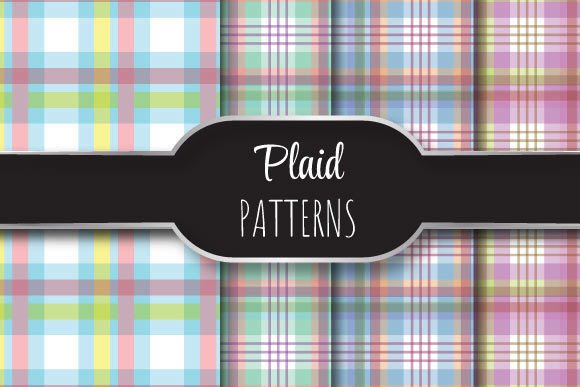
Colorful Plaids refers to a curated collection of vector-based plaid patterns designed for high-resolution, repeatable use in professional design and print applications. Each pattern is built as a seamless tile—meaning it repeats smoothly across any surface without visible seams or breaks—making it suitable for textiles, packaging, stationery, wall graphics, and other large-format or tiled outputs. The set includes four distinct plaid designs, each delivered in two complementary formats: EPS 10 (editable vector) and JPEG (high-fidelity raster preview), all at 12 × 12 inches (3600 × 3600 pixels, 300 dpi).
Why Designers Consider Colorful Plaids
Designers often seek ready-made, production-ready patterns when time, consistency, or technical precision are priorities. Colorful Plaids addresses several common needs: the desire for vibrant, contemporary plaid motifs that avoid dated or overly traditional associations; the need for scalability without quality loss; and the requirement for reliable tiling behavior across variable dimensions. Unlike hand-drawn or low-res pattern scans, these files are constructed with vector paths and mathematically aligned repeats—ensuring fidelity whether scaled to a business card or a 10-foot banner.
Users evaluating this set typically fall into one of three groups: graphic designers integrating patterns into branding assets; textile or product designers prototyping fabric prints; and marketing professionals developing cohesive visual campaigns where background texture supports hierarchy and tone. In each case, the decision hinges less on novelty and more on functional compatibility—does the file format support their workflow? Does the resolution meet output requirements? Does the color palette align with existing brand guidelines?
Key Benefits and Realistic Tradeoffs
The primary benefit of Colorful Plaids lies in its technical readiness. EPS 10 files are compatible with Adobe Illustrator and other vector editors that support legacy EPS standards, allowing for color adjustments, resizing, and integration into layered layouts without rasterization. The inclusion of matching JPEG previews (also 3600 × 3600 px, 300 dpi) enables quick mockups, client presentations, or CMS uploads where vector support isn’t available.
However, there are important considerations. EPS 10 is a mature but aging format—not all modern design tools open it natively, and some cloud-based or mobile apps lack full support. Users relying exclusively on Affinity Designer, Figma, or Canva will need to convert or rasterize the files first, potentially losing editability. Additionally, while the 300 dpi JPEGs are print-suitable for standard 12-inch outputs, they do not scale infinitely like vectors—enlarging beyond 12 inches risks pixelation unless resampled carefully.
Another tradeoff involves customization scope. These are finished patterns—not parametric generators. Adjusting stripe width, angle, or color relationships requires manual vector editing. If your project demands dynamic variation (e.g., dozens of plaid variants across a seasonal line), a scriptable or generative tool may offer more flexibility than a fixed set of four designs.
Situations Where Colorful Plaids Is a Strong Fit
This set performs best when used in contexts that value consistency, speed, and print fidelity. For example:
- A branding agency building a stationery suite for a lifestyle client can drop a plaid into letterhead, envelopes, and presentation decks—knowing the same tile aligns perfectly across all sizes and media.
- A small-batch apparel designer preparing digital proofs for a limited-run scarf collection benefits from accurate color representation and seamless tiling at true-to-production scale.
- A packaging designer incorporating subtle background texture into a luxury soap box can place the pattern confidently, assured that registration and bleed calculations remain predictable.
In each case, the value isn’t in uniqueness—it’s in reliability. When deadlines are tight and output tolerances narrow, having four rigorously tested, pre-aligned plaids reduces trial-and-error during prepress.
When Alternatives May Be More Appropriate
Colorful Plaids may be less suitable if your workflow emphasizes collaboration across non-Adobe tools, requires frequent real-time editing, or depends on responsive scaling across web and app interfaces. In those cases, SVG-based pattern libraries or CSS-native repeating gradients could provide broader compatibility and smaller file footprints.
Similarly, if your project calls for historically accurate tartans, region-specific weaves, or highly technical specifications (e.g., thread count mapping for jacquard looms), dedicated textile CAD software or licensed heritage pattern archives would offer deeper fidelity than a general-purpose vector set.
Finally, users needing accessibility-aware contrast or WCAG-compliant color pairings should verify swatches individually. While the set uses vivid, varied hues, contrast ratios between adjacent stripes aren’t standardized—and may require adjustment depending on foreground text or icon placement.
Making an Informed Decision
Evaluating Colorful Plaids begins with clarifying your intended use case—not just what you want the pattern to look like, but how it will move through your pipeline. Ask yourself:
- Which software will I use to edit or place the pattern? Does it fully support EPS 10, or will I rely mostly on the JPEGs?
- What are my largest and smallest output dimensions? If scaling beyond 12 inches is routine, vector editability becomes essential.
- How many variants do I realistically need? Four distinct plaids cover moderate diversity—but if your project spans multiple sub-brands or seasonal themes, licensing a larger library may reduce long-term overhead.
- Is color accuracy critical? Check whether your monitor is calibrated and whether your printer profile matches the embedded color space (typically CMYK or RGB—verify per file).
Also consider archiving and version control. Because EPS files embed fonts and effects differently than modern AI or SVG formats, saving editable backups in your native application’s native format (e.g., .ai) after initial import helps preserve future flexibility.
Ultimately, Colorful Plaids serves a specific niche: designers who prioritize production-ready quality over infinite customization, and who work within ecosystems where EPS 10 remains viable. It is neither a universal solution nor a trend-driven novelty—but a focused, technically sound resource for situations where seamless repetition, color richness, and print-grade resolution converge.