Flowers Series Digital Paper Patterns: 10 Versatile, Print-Ready Designs for Creative Projects
Whether you're a digital scrapbooker, a small-batch product designer, or a DIY entrepreneur launching your first Etsy shop, finding high-quality, flexible design assets makes all the difference. The Flowers Series digital paper patterns deliver exactly that — ten cohesive, richly detailed floral motifs crafted for real-world creative use. Not just another set of clipart or generic backgrounds, this collection is built from the ground up for versatility, resolution integrity, and immediate usability.
What Makes the Flowers Series Stand Out?
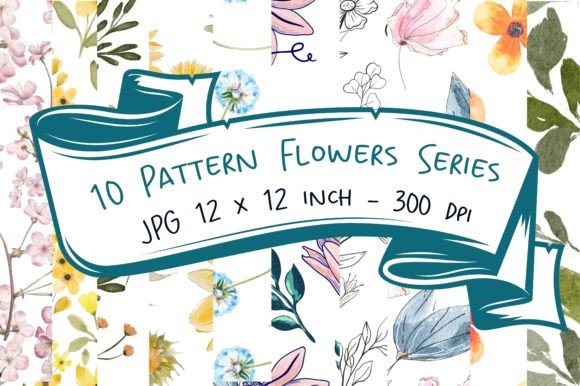
At its core, the Flowers Series is more than pretty petals — it’s a thoughtfully engineered toolkit. Each of the ten patterns features hand-drawn or digitally refined botanical elements: climbing vines, clustered blossoms, delicate sprigs, abstract florals, and layered compositions that balance repetition with organic variation. Unlike mass-produced seamless tiles that feel flat or overly symmetrical, these designs breathe — they invite texture, layering, and tactile interpretation.
The 10 Flowers Series digital paper patterns are delivered as a single ZIP file containing ten individual JPG files — each precisely 12 x 12 inches at 300 dpi (3600 x 3600 pixels). That resolution isn’t arbitrary. It means you can confidently scale down for phone cases or nail wraps without pixelation — and scale up for large-format prints like wall art or fabric yardage without losing clarity.
Designed for Real Creative Workflows
You don’t just collect digital papers — you use them. And how you use them depends on your tools, timeline, and output goals. Here’s where the Flowers Series shines across common creative scenarios:
- Invitations & Stationery: Layer a soft watercolor-style floral pattern behind elegant serif typography for wedding invites — or reverse it for bold white text over deep navy blooms. Because each file is RGB and JPG-based, it imports smoothly into Canva, Adobe Express, Affinity Designer, or even Microsoft Word with no color-shift surprises.
- T-Shirts & Apparel: Use one pattern as an all-over print for a relaxed linen tee, or isolate a single bloom using selection tools to create a centered chest motif. The consistent 300 dpi ensures crisp screen printing or DTG (direct-to-garment) results — no upscaling guesswork required.
- Cell Phone Covers & Tech Accessories: Fit any standard iPhone or Samsung model by cropping to 2.5" x 5" (or your device’s exact dimensions). The high-res source lets you zoom in on fine stamen details or leaf veins — perfect for matte-finish cases where subtlety reads as luxury.
- Jewelry & Magnets: Laser-cut acrylic pendants or ceramic magnets benefit from clean edges and strong contrast. Several patterns in the series feature defined outlines and mid-tone backgrounds — ideal for vector conversion or silhouette extraction in Silhouette Studio or Cricut Design Space.
- Nail Wraps & Small-Scale Crafts: Yes — even at thumbnail size, these hold up. A single 3600 px canvas gives you room to extract a 400–600 px repeatable tile for nail art sheets, or crop tightly around a daisy cluster for a minimalist ring dish decal.
Why Resolution + Format Matter More Than You Think
It’s tempting to grab free “high-res” downloads — but many labeled “300 dpi” are actually upscaled from much smaller originals. That’s where the Flowers Series avoids compromise. Each 3600 x 3600 px file was created natively at full size, preserving subtle gradients, soft shadows, and intentional texture grain. No interpolation. No blur. Just what you’d expect from a professional surface pattern designer.
JPG format may seem basic — but it’s strategic. Unlike PNGs (which carry transparent backgrounds that sometimes misalign in print workflows) or PSDs (which require specific software), JPGs open instantly across platforms. They’re lightweight, universally compatible, and reliably embed in PDFs for printer handoff. For designers juggling multiple clients or tight deadlines, that compatibility saves minutes per project — which adds up to hours saved each week.
How to Get the Most From Your 10 Flowers Series Files
Start with intention. Ask yourself: What’s the end use? What’s the dominant color story? Does this need to sit behind text — or stand alone as a focal element?
For invitations or social media graphics, try lowering the opacity of a bold floral pattern to 15–25% as a background layer — then overlay solid-color shapes or semi-transparent frames to guide the eye. For t-shirt mockups, test print a 4" square swatch first: hold it at arm’s length. If the detail still reads clearly, you’re golden.
Don’t overlook color adaptation. While the patterns ship in their original palettes (think sage-and-cream, indigo-and-mustard, or blush-and-charcoal), most design apps let you recolor non-destructively. In Photoshop, use Hue/Saturation adjustment layers. In Procreate, try the “Color Fill” layer mode with blend modes like Color or Luminosity. The underlying structure stays intact — only the mood shifts.
Pairing With Other Elements — Without Visual Clash
A common concern? “Will this floral pattern compete with my fonts or photos?” The answer lies in contrast — not avoidance. Choose one dominant visual weight in your layout. If your floral pattern has strong line work and tight repeats, pair it with clean, airy typefaces (like Montserrat Light or Lora Italic). If the pattern is painterly and soft-edged, go bolder with sans-serif headers or geometric icons.
When combining with photography — say, for a boutique website banner — place the Flowers Series pattern as a subtle overlay (10–15% opacity) on top of your image. Or use it as a border frame, masking the edges to create a natural vignette effect. It adds cohesion without overwhelming your subject.
Who Benefits Most From This Collection?
This isn’t just for seasoned designers. Teachers crafting classroom decor, crafters making personalized gifts, bloggers designing Pinterest pins, and indie makers producing limited-run stationery all find immediate value. The 10 Flowers Series digital paper patterns remove friction — no hunting for compatible scales, no wrestling with mismatched DPI, no licensing ambiguity.
If you’ve ever paused mid-project because a background looked blurry when enlarged, or spent 20 minutes adjusting a seamless tile’s alignment — this set solves that. It’s designed for momentum. For confidence. For the quiet satisfaction of knowing your foundation is solid — so your creativity can take center stage.
Practical Tips Before You Download
- Check your software’s import limits. Some free-tier apps cap file size — but at ~8–12 MB per JPG, these fall well within most platforms’ allowances.
- Organize smartly. Rename files descriptively: “FlowersSeries_07_WatercolorPeony.jpg” instead of “IMG_2948.jpg”. Future-you will thank you when sourcing for a client revision.
- Test print one before bulk use. Even with perfect specs, your printer’s color profile may shift slightly. A quick A4 test reveals how creams render on uncoated stock or how deep burgundy holds on kraft paper.
- Respect the license. These are for personal *and* commercial use — meaning you can sell physical products made with them (like printed cards or embroidered patches). But redistribution, resale as digital files, or claiming authorship isn’t permitted.
The Flowers Series doesn’t ask you to adapt your process — it adapts to yours. Whether you’re sketching ideas on paper, building in Figma, or cutting vinyl on a Cameo, these ten patterns meet you where you are. They’re ready when you are. And that kind of reliability? That’s the quiet power behind every great creative decision.