Wacky Snow Leopard Pattern Bundle
The Wacky Snow Leopard Pattern Bundle is a purpose-built digital textile resource designed for creators who need vibrant, high-fidelity animal-inspired patterns without the overhead of custom design or licensing complexity. It’s not just another pattern pack—it’s a production-ready asset that slots directly into existing creative and commercial workflows. Whether you’re preparing printable scrapbook paper for a craft store launch, developing sublimation-ready designs for an apparel line, or building layered digital backgrounds for a client presentation, this bundle delivers consistency, color variety, and technical readiness in one package.
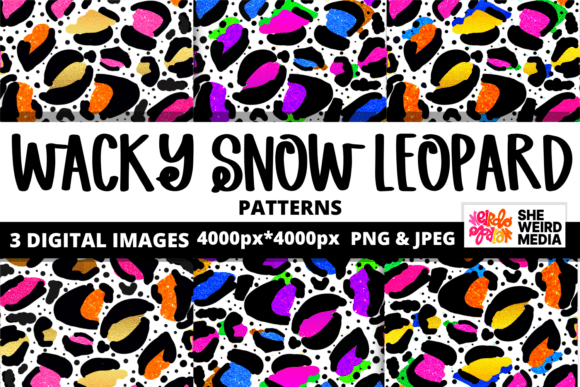
At its core, the bundle contains three distinct color variations of a stylized snow leopard motif—playful, bold, and intentionally “wacky” in execution. The spots are exaggerated, the palette is saturated but balanced, and the rhythm of the repeat feels dynamic rather than static. Unlike generic animal prints, these patterns avoid photorealism in favor of expressive energy—making them ideal for projects where personality and visual distinction matter more than literal accuracy.
How It Fits Into Real Creative Workflows
For seamstresses and textile designers, the Wacky Snow Leopard Pattern Bundle functions as a starting point—not an endpoint. You don’t need to build a seamless repeat from scratch or adjust scale for fabric grain. Each pattern is delivered at 4000px × 4000px in PNG format with transparent backgrounds, meaning it integrates cleanly into Adobe Photoshop, Affinity Designer, Procreate, or Cricut Design Space without clipping masks or background cleanup. That saves 15–30 minutes per project—time that compounds across dozens of designs in a seasonal collection.
In print-on-demand (POD) operations, compatibility isn’t optional—it’s operational. These files meet key platform requirements: they’re RGB, high-resolution, and free of watermarks or embedded metadata that could trigger rejection on sites like Printful, Redbubble, or Teespring. Because each variation is color-shifted—not recolored using global adjustments—you get true tonal alternatives: one with coral and teal accents, another leaning into mustard and plum, and a third built around electric blue and lime. That gives you immediate A/B testing options for product mockups, social previews, or email campaign variants—no re-rendering needed.
Before, During, and After Project Integration
Before launching a new product line or campaign, use the bundle to prototype quickly. Load one pattern into Canva or Figma and apply it to a mockup template—tote bag, notebook cover, phone case. Observe how the scale interacts with real-world dimensions. Does the spot size read clearly at 8 inches wide? Does the contrast hold up on matte paper versus glossy? This kind of pre-flight testing prevents costly reprints or platform takedowns later.
During active development, treat the patterns as modular components. For example, if you’re designing a set of digital scrapbook kits, layer one leopard variation as a background, then overlay hand-drawn journaling cards or brushstroke elements. Because the transparency is clean and the resolution high, blending modes work predictably—multiply for depth, screen for lightness, overlay for texture. No pixelation, no jagged edges, no guesswork about DPI conversion.
After finalizing assets, organize your working files with intention. Save edited versions using clear naming conventions: wacky-leopard-coral-background-layered.psd, wacky-leopard-mustard-sublimation-optimized.png. Keep the original ZIP intact as your master archive. That discipline pays off when you revisit the project months later—or hand it off to a collaborator. Consistency in file handling supports long-term scalability, especially if you expand into related bundles (e.g., wacky zebra or abstract jungle motifs).
Practical Implementation Tips
- Scale wisely: While 4000px offers flexibility, avoid upscaling beyond 200% in raster editors. For large-format printing (e.g., wallpaper or fabric yardage), test a 12×12 inch swatch first—some printers interpolate differently at extreme enlargements.
- Color-check early: RGB-to-CMYK conversion can mute vibrancy. If printing physically, request a hard proof before bulk runs. For sublimation, run a small test on your target substrate (polyester blend vs. ceramic mug) to verify spot definition and bleed control.
- Layer thoughtfully: Use the transparent background to your advantage. Place text over lighter spots, or add subtle drop shadows to lift elements off the pattern without obscuring the design.
- Repurpose intelligently: A single pattern can serve multiple outputs. Use the same coral variation for gift wrap, then isolate a 300px section as a social media border, and extract a single spot as a bullet icon in a presentation deck.
Compatibility and Cross-Platform Use
The Wacky Snow Leopard Pattern Bundle doesn’t require proprietary software or subscriptions. Its PNG format ensures universal compatibility—from desktop applications like Illustrator and GIMP to browser-based tools like Photopea and Kittl. For educators building lesson materials, it works seamlessly in Google Slides or PowerPoint. For marketers, it imports cleanly into Mailchimp templates or Shopify theme editors. Even if your workflow includes AI-assisted tools (e.g., generating matching typography or color palettes), the bundle’s clarity and contrast give those tools reliable input data.
It also coexists well with physical materials. Seamstresses pair it with cotton voile or polyester spandex for apparel; scrapbookers print it on cardstock or vellum; gift wrap designers run it through home inkjet printers with premium matte paper settings. The lack of watermarks means no last-minute cropping or opacity fixes—just direct, confident output.
Quality Control and Long-Term Usability
Each pattern undergoes manual repeat alignment verification—not algorithmic tiling. That means no visible seams or misaligned edges when tiled across large surfaces. You’ll notice this most when applying the pattern to full-page digital backgrounds or wall murals. Also, because all three variations share the same base geometry and spacing, switching between them maintains compositional balance. That consistency reduces cognitive load during decision-making—especially when managing multiple SKUs or brand extensions.
For freelancers managing client revisions, having three ready-made alternatives eliminates the “let me try something else” delay. Present all three in context—same layout, same typography—and let the client choose based on mood or market fit, not technical limitations. That builds trust and streamlines approval cycles.
Where It Adds Value Beyond Aesthetics
Beyond visual appeal, the Wacky Snow Leopard Pattern Bundle supports strategic goals: differentiation in saturated markets, speed-to-market for seasonal collections, and accessibility for non-designers entering creative entrepreneurship. A small business owner launching eco-friendly notebooks doesn’t need a graphic designer on retainer to create compelling covers—just this bundle, a printer, and 20 minutes. An educator building classroom posters gains instant visual cohesion across subject areas without sourcing disparate assets.
It’s also low-risk experimentation. Try pairing one variation with minimalist sans-serif type for modern branding—or with distressed textures for vintage packaging. Because the files are yours to keep, license-free and watermark-free, there’s no subscription cliff or usage cap. What you build stays yours, scalable and transferable across platforms and projects.
In short, the Wacky Snow Leopard Pattern Bundle isn’t about adding decoration—it’s about removing friction. It fits where you already work, respects your time, and scales with your ambition—whether you’re prototyping a single greeting card or launching a full textile line.