Christmas Sweater Pattern Bundle
If you’ve ever spent hours sketching a reindeer with tinsel antlers—only to realize your design won’t scale cleanly for a vinyl cut or screen print—you know the quiet frustration of loving an idea but lacking the right tools. That’s where the Christmas Sweater Pattern Bundle steps in—not as another generic clipart pack, but as a ready-to-deploy toolkit built for real-world making.
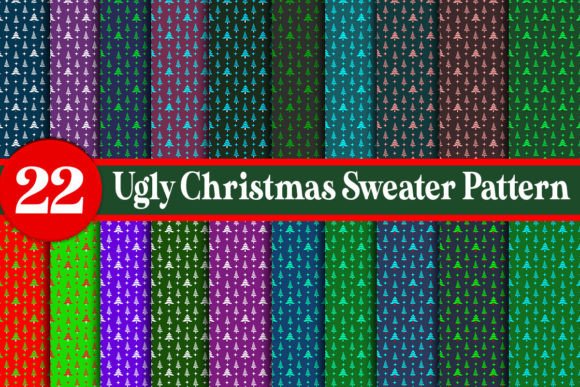
This isn’t just about “ugly” for the sake of chaos. It’s about intention: bold outlines for heat-transfer vinyl, crisp edges for Cricut and Silhouette machines, layered flexibility for sublimation or DTG printing, and high-res clarity that holds up whether you’re printing on toddler tees or oversized hoodies. The Ugly Christmas Sweater Pattern Bundle includes 22 JPG files at 300dpi (4500x5400 pixels), plus EPS, DXF, and PNG versions—so whether you’re cutting vinyl, prepping for embroidery digitizing, or dropping assets into Canva or Illustrator, the file type matches your workflow—not the other way around.
When and Where These Patterns Actually Get Used
Think beyond December 25. These patterns land in real places, on real timelines:
- A small-batch apparel brand launching a limited holiday collection in early November uses the EPS files to adjust colors and spacing in Illustrator—then sends clean vector files straight to their DTG printer. No pixelation. No last-minute tracing.
- A school art teacher preparing a week-long textile design unit downloads the PNGs with transparent backgrounds. She imports them into Google Slides, layers them over student-drawn motifs, and prints them onto iron-on transfer paper for fabric collage projects.
- A freelance graphic designer hired by a local brewery for their “Ugly Sweater Tap Night” event pulls the DXF files into Silhouette Studio, resizes a snowman holding a pint glass to fit a 6-inch chest patch, and cuts it from glitter vinyl—all before lunch.
- A blogger documenting DIY home decor uses the JPGs in Lightroom to mock up sweater designs on flat-lay photos—no need to stage physical samples when high-res, true-to-proportion templates do the work.
Why Format Variety Matters More Than You Think
It’s not about having “more files.” It’s about avoiding roadblocks. A PNG looks great on Instagram—but if you try to cut it with a vinyl plotter, the software sees a raster image and guesses at edges. An EPS keeps curves smooth at any size, but many entry-level craft apps don’t open it. That’s why this bundle includes all four formats: you pick the one that fits your tool, your deadline, and your skill level—without compromising quality.
The 300dpi resolution isn’t overkill—it’s insurance. At 4500x5400 pixels, even large-format prints (like a 24x36" poster for a holiday market booth) stay sharp. And because every JPG is sized identically, swapping designs in a batch layout—say, for a set of 12 different crewneck options—is drag-and-drop consistent, not guesswork.
Real Use Cases You Might Not Expect
These patterns go further than apparel:
- Classroom visual aids: A middle school science teacher overlays a “reindeer anatomy” diagram (yes, it’s a thing) onto a sweater pattern using the transparent PNG—then prints it onto cardstock for a lighthearted dissection activity.
- Small business signage: A coffee shop owner uses the tie dye shirt patterns template to create a playful window decal—scaling the swirls to fit the glass, then cutting them from matte black vinyl with her Cricut Maker.
- Digital course materials: A Canva-certified educator bundles the SVG-ready EPS files into a “Design Your Own Merch” workshop module—students learn layering, color separation, and export settings using actual production-ready assets.
- Community event kits: A PTA rep orders bulk blank tees, downloads the t shirt pattern files, and sets up a station where kids place vinyl decals using the included alignment guides baked into each design’s safe-zone margin.
What to Consider Before You Download or Use
Not every pattern works for every project—and that’s okay. Here’s what helps users make smarter choices:
- Know your output method first. If you’re cutting vinyl, prioritize DXF or EPS. For digital mockups or social posts, high-res JPGs are faster and lighter. For embroidery prep, you’ll likely trace the PNGs into stitch software—but the clean lines save hours over messy clipart.
- Check your base garment color. Some “ugly” designs rely on contrast—like white snowflakes on dark green. If you’re printing on heather grey or oatmeal, test a small section first. The bundle’s color-agnostic vectors let you adjust fills easily, but contrast still matters.
- Think about wearability—not just looks. A dense, all-over tie dye shirt patterns template might look fun on screen but overwhelm a fitted tee. Use the preview dimensions (4500x5400 px) to simulate coverage: at 300dpi, that’s roughly 15x18 inches—plenty for a full front print, tight for a pocket logo.
- Respect usage scope. This is a pattern shirt and t shirt pattern resource—not a commercial license for mass resale of the raw files. You’re free to use them on products you sell, but not to repackage and resell the EPS or DXF files themselves.
Who Benefits—and How It Shows Up in Their Work
A freelance marketer running holiday email campaigns uses the patterns to build themed banners—swapping out a candy cane motif for a snow globe in under two minutes. A hobbyist restoring vintage sewing machines prints the patterns onto fusible webbing and appliqués them onto denim jackets—no digitizing, no embroidery hoop. A homeschool parent turns the tie dye shirt patterns template into a color-mixing lesson: “What happens when you overlay magenta and cyan swirls?”
Even educators who don’t teach art find value. One high school English teacher used the “ugly” aesthetic intentionally—having students write satirical holiday poems and pair them with absurd sweater motifs from the bundle, then present them as illustrated broadsides. Engagement spiked. So did vocabulary retention.
That’s the quiet strength of the Ugly Christmas Sweater Pattern Bundle: it doesn’t ask you to become a designer. It meets you where you are—with a Cricut, a laptop, a classroom budget, or a pop-up stall at the farmers’ market—and gives you clean, adaptable, production-ready starting points. No tutorials required. No licensing rabbit holes. Just patterns that behave the way real tools should: reliably, flexibly, and without drama.